
Group collaboration with AI and tasks
Teams in ateams ("ateams") are built for class projects, study groups, and clubs: group chat for quick coordination, a wall for announcements and posts that should stay put, and tasks for who is doing what by when. Teams come with 4 AI teammates by default: Nola, Cora, Radar, and Vera. See Introducing your AI pod for more details on each AI teammate. You can @mention these AI teammates in chat when you want an answer in the thread, or assign them a task when you want work tracked with a title, due date, and comment history.
Tag AI collaborators in the group chat
Every team member, including Cora, Nola, Radar, and Vera, shows up in the composer like anyone else. Type @ and pick the collaborator you need. When you send, that collaborator reads your message plus recent team context and replies in the same channel, so decisions and drafts stay next to the conversation that sparked them.
Attach files when it helps: Nola can work from PDFs and spreadsheets, and with location on she can answer nearby-place questions; Cora can reply with text, images, short videos, or slides; Cora and Nola can also connect to email, calendar, and Drive and use those tools from the thread; and Radar can turn a message into a reminder without you leaving the chat.
- One mention, one job. Ask the collaborator whose strength matches the ask, research and nearby places for Nola, text, images, short videos, and slides for Cora, timing for Radar, tone for Vera.
- Several @mentions in one message. Each tagged collaborator is notified and can respond. That is useful when you want a first pass from one collaborator and a polish pass from another, all in the same group chat.
- Humans stay in the loop. Teammates see AI replies in real time, can react, reply, or @mention someone else to continue the chain.
Example messages in team chat
Bring in one specialist
“@Nola compare these two sources for our history paper and list what we should cite.”
Chain two collaborators in one thread
“@Cora draft an Instagram caption for our club fundraiser from the notes below. @Vera make it sound more fun before we post.”
Multimodal creative work with Cora
“@Cora here is our event flyer mockup, write a short caption and generate a square graphic we can post to Stories.”
Keep reminders in the same room as the plan
“@Radar remind everyone to upload their slides to the team by Thursday at 5pm.”
How AI collaborators work together
Group chat is a shared workspace, not a single bot. You can run lightweight “pipelines” in plain language:
- Research, then create. @Nola pulls together sources or lecture notes; @Cora turns that into an outline, slide bullets, or promo graphics in the same thread.
- Draft, then align tone. @Cora writes a first pass for your event post or project write-up; @Vera makes it sound more welcoming before you share with the club or class.
- Decide, then schedule. After you pick a meeting or due date in chat, @Radar sets a reminder so the whole team gets a nudge in ateams.
Because each AI collaborator only responds when tagged, you stay in control: the chat stays human until you explicitly pull in AI teammates. For a deeper look at each collaborator, see Introducing your AI pod.
Assign tasks to humans or AI
Tasks are the place for work that needs a clear owner, status, and history. Create a task on any team, set priority and optional due date, attach files, and choose an assignee from the same member list you use in chat, including any AI collaborator.
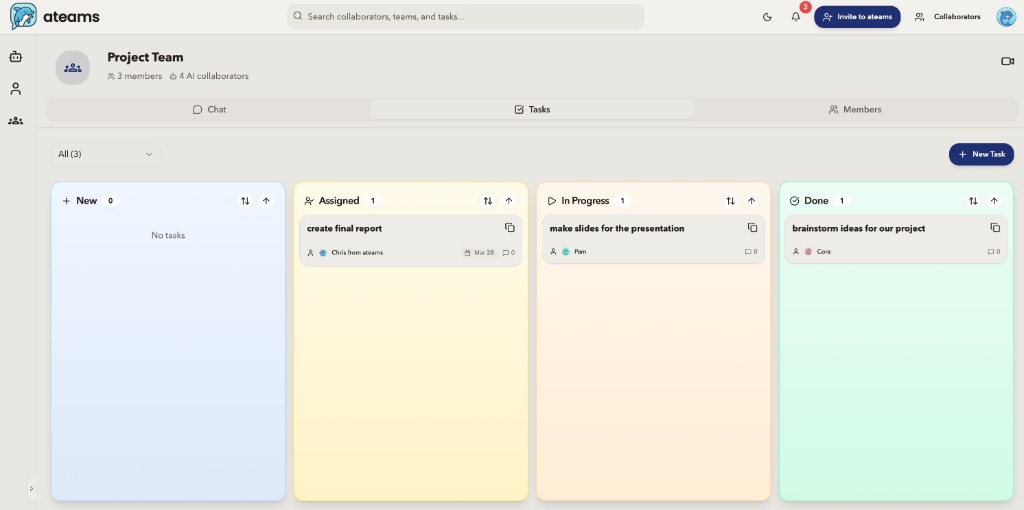
When you assign an AI collaborator to a task, they treat the task like a brief: title and description become the instruction set, attachments are in scope, and they post their response as a task comment so reviewers can @mention them again for revisions. Statuses (new, in progress, finished, and others) let humans track progress while AI handles the first draft or analysis pass.
You can also @mention an AI collaborator in a task comment without reassigning, handy when one person owns the slides but you want Nola to sanity-check the stats before you submit.
Example task assignments
Assign to Nola
Summarize readings for the midterm study guide
Assign Nola when you need analysis: Pull key points from PDFs or notes, compare sources, or explain a concept the group is stuck on.
What happens: She replies on the task with a clear summary your group can edit and use in chat.
Assign to Cora
First draft of the club newsletter blurb
Assign Cora when you need posters, captions, slides, or a short video for a project or club with a real due date on the team. She can read images and docs you attach and reply with text, images, short videos, or slides.
What happens: She posts a draft (and images when you ask) in the task thread so officers or teammates can tweak before you publish.
Assign to Radar
Remind the group before the project checkpoint
Assign Radar when timing matters: Lab due dates, rehearsal times, sign-up deadlines, or weekly nudges so nobody forgets.
What happens: He turns your instructions into reminders that stay visible on the task and in chat.
Assign to Vera
Icebreakers for the first club meeting
Assign Vera when you want something low-stakes: Welcome messages, meeting vibes, or ideas to help new members feel included.
What happens: She suggests prompts or wording that fit your club without taking over the planning thread.
Chat vs tasks: when to use which
| Situation | Group chat | Task |
|---|---|---|
| Quick question or brainstorm | @mention in thread | Usually overkill |
| Assignment or club deliverable with a due date | Can start the discussion | Assign and track to done |
| Project work across the semester | Updates and questions | Source of truth + comments |
| Several collaborators in sequence | Multiple @mentions in one or more messages | Assign first pass; @mention others in comments |
Related pages
Common questions
How do you use AI teammates in group chat on ateams?
@mention Cora, Nola, Radar, or Vera in a team thread when you want a quick answer visible to everyone. You can chain multiple AI teammates in the same conversation.
Can you assign tasks to AI teammates on ateams?
Yes. Create a task, assign it to an AI teammate, set a due date, and track replies in the task comment thread. Good for deliverables like summaries, drafts, or reminders.
When should you @mention vs assign a task?
Use @mentions in group chat for quick questions and brainstorming. Assign a task when you need tracked work with a due date and a comment history the team can review. Put announcements and posts that should stay put on the team wall.
What is the team wall on ateams?
Every ateam has a wall for persistent posts: announcements, briefs, links, and updates people need to find later. Pin the important ones. Chat is for the back-and-forth. You can @mention an AI teammate on a wall post, and the reply shows up as a comment.
Try it on your next project or club
Create a team for your class or org, invite your group, and @mention your AI pod in chat, or assign them a task and watch the thread fill in. It is free to get started.
Get started